Google Business Profile Guidance
Google Business Profile Video Verification Guide and Practical Steps
Google Business Profile video verification helps business owners show that their business is genuine, operates as described, and is managed by an authorized person. If Google requests a verification video, preparing suitable evidence before recording can prevent common errors and reduce the chance of repeating the process.
Unlike a marketing video, a verification recording is intended to establish trust rather than promote products or services. It provides authentic evidence that supports the details on your Google Business Profile. The evidence needed depends on whether you run a storefront, a service area business, or a business that welcomes customers at its premises and also serves them elsewhere.
Google's official guidance requires a unique, unedited, continuous recording lasting at least 30 seconds, captured and submitted through the Business Profile verification process on a mobile device. Previously recorded footage cannot replace the required live recording. Google's video verification instructions describe the current process and the evidence relevant to different business categories.
This guide covers preparation, the evidence to capture, differences between storefront and service area businesses, video submission, and practical steps to take when an initial recording is not accepted.
1. Understanding Google Business Profile Video Verification
Video verification is a verification option that Google may make available for a Business Profile. It allows Google to assess a live recording containing evidence about the business and the person completing the verification request.
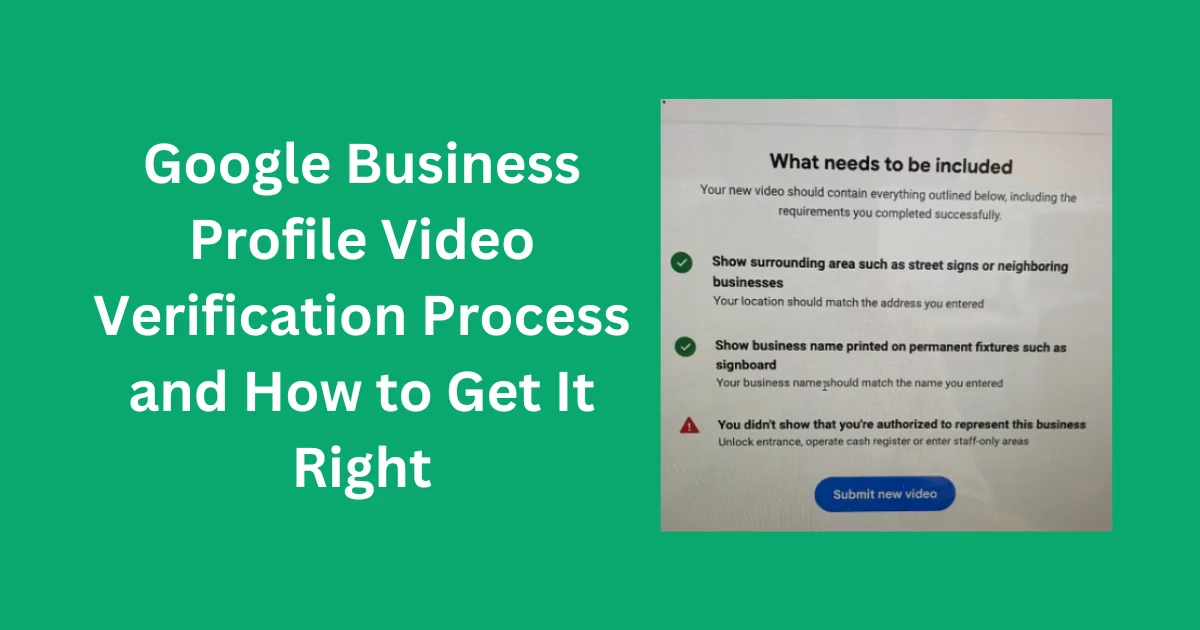
The recording should establish three key facts. First, it should connect the business to the location or service area stated on the profile. Second, it should provide evidence that the business operates and carries out the activities or services it describes. Third, it should demonstrate that the person submitting the recording is authorized to manage or represent the business.
Suitable evidence depends on how the business operates. A retail shop might show its permanent signage, nearby streets, and access to an employee-only area. A plumber or another mobile service provider might show recognizable location details, professional tools, branded work vehicles, and access to business equipment.
Google Business Profile eligibility also matters. Businesses generally need qualifying in-person contact with customers. An online-only company without eligible in-person services does not become eligible simply because its owner submits a verification video.
Verification recordings should not be confused with public videos uploaded to a profile for promotion. Marketing videos can highlight products, employees, or customer services. Verification footage is submitted through Google's designated process to establish business legitimacy and the submitter's authority.
Before recording, review your profile details and correct any inaccurate information. Our Google Business Profile optimization services can help you assess profile accuracy and consistency. However, profile optimization cannot replace the evidence Google requires for verification.
2. Common Reasons Google Requests Video Verification
Google selects the verification methods available to each profile. It may request a video when additional evidence is needed to confirm that a business is legitimate and that its manager has permission to represent it.
New listings may need verification before their information becomes fully available to customers. Established businesses can also receive another verification request after certain profile changes. Moving to another address or changing how customers access your services, for example, may require Google to check the updated details.
Every verification request does not have the same cause. Receiving one does not automatically mean your business has broken a policy, nor does it necessarily indicate that suspension is imminent. Check your profile status and carefully follow the specific instructions provided by Google.
Some owners expect verification to be a one time process. However, Google may request further confirmation when it needs to maintain accurate business information. If another request appears, review recent changes to your business name, address, category, or operating arrangements.
Check that your profile matches your actual business operations before recording. Our Business Profile audit service can help identify inconsistencies between your profile, website, and other business listings. Google's current verification instructions should always guide the evidence you submit.
3. Essential Google Business Profile Video Verification Requirements
Review Google's current recording instructions before you begin. A video may be insufficient if it misses important evidence, even when the underlying business is genuine.
- Continuous footage: Record one uninterrupted video without editing, cuts, or joined segments.
- Minimum duration: Keep the recording at least 30 seconds long to meet Google's stated minimum.
- Official recording process: Use a mobile device and complete the recording and submission steps provided in your Business Profile.
- Business specific proof: Capture relevant evidence of your location, genuine operations, and authority to manage the business.
- Personal data protection: Keep bank details, tax references, identification numbers, and other confidential information out of view.
- Privacy protection: Avoid recording other people's faces or exposing their private information.
Prepare your recording plan in advance, but do not film it separately and try to submit the saved clip from your phone gallery. Google's verification procedure requires the video to be recorded live using the supported recording process.
Arrange the necessary areas and items before you begin. If you need to show business signage, ensure it is easy to see and reflects your actual business name. If tools or a work vehicle are relevant, have them ready and make sure they relate to the services you provide.
Never create misleading proof or make a location appear to host a business that does not genuinely operate there. Your recording must reflect your real business premises, working practices, and customer service arrangements.
For help maintaining your listing, Google Business Profile management can provide guidance on keeping business information organized. The verification recording itself must still meet Google's specified process and requirements.
4. Google Video Verification for Storefront Businesses
A storefront business welcomes customers at a physical premises during its published business hours. Common examples include qualifying retail stores, restaurants, clinics, and other public-facing establishments. Google states that storefront businesses should display permanent signage identifying the business at its location.
Your recording should establish where the business operates, show that it genuinely exists, and demonstrate your authority to manage it. Organize the evidence so that all necessary details can be captured in one continuous video.
Capture the business surroundings
Start by showing useful location clues. Street signs, building numbers, neighboring businesses, and recognizable landmarks can help connect the premises with the address listed on your profile.
Provide enough context to make the location understandable instead of filming only a doorway or wall. A close view of an isolated entrance may not establish the business address. Capture clear surroundings that help identify the actual premises.
Record the permanent business sign
Film the storefront, entrance, or showroom so that the business name can be read on permanent signage, a wall sign, or a fixed window display. The displayed name should correspond with the name used on your Business Profile.
If the sign is difficult to read, hidden from view, or different from the profile name, resolve any genuine inconsistency before recording when possible. Avoid temporary signs created only to suggest that a location meets Google's requirements when they do not reflect the actual business.
Demonstrate authorized access
Show evidence that you operate or represent the business by recording access to a resource available to authorized personnel. Depending on your establishment, this could involve unlocking the entrance, opening a register, accessing a sales terminal, or entering a restricted stockroom.
Use appropriate evidence while protecting privacy and security. Keep customers, other people's faces, confidential paperwork, and sensitive information on digital displays out of the recording.
If your storefront has moved or adopted a different business name, check your listing details before submission. Our verified business listing guidance can help clarify eligible listing setup. Do not create a duplicate profile simply to avoid a difficult verification request.
5. Google Video Verification for Service Area Businesses
A service area business visits customers or completes work at their locations instead of receiving customers at its own address. Typical examples include plumbers, electricians, cleaners, locksmiths, and selected repair or property maintenance providers.
These businesses do not need to present themselves as conventional storefronts. Their verification video should accurately reflect their operating arrangements and show evidence that fits the services they genuinely provide.
Establish your operating location
When requested, capture relevant location details such as street signs, building numbers, or nearby landmarks. For a home based service provider, recognizable signs and features in the surrounding neighborhood may help establish the location context.
If customers are not served at your business address, keep that address hidden from the public profile. Follow Google's service area business policies and avoid presenting a private residence as a public customer facing establishment.
Record tools and work materials
Show the equipment, supplies, tools, or workspace you genuinely use in your daily operations. A plumber can record relevant plumbing tools, while a cleaning provider can show professional cleaning supplies. A genuine branded work vehicle or service related materials may also support the evidence.
Make sure the items relate directly to the services listed on your profile. Ordinary office furniture may not adequately demonstrate your work activities. Do not use another company's equipment or display branding that could misrepresent who operates the business.
Establish your role in the business
Show authorized access to business resources or record a genuine work activity when suitable. For example, you might unlock a branded work vehicle or access equipment used to deliver your services.
Where Google's instructions call for supporting documents, relevant business permits, invoices, or utility bills may help establish your connection to the business. Ensure that confidential reference numbers and personal information remain out of view.
For a service area business, accurate evidence of your real operating model is essential. Our service area business verification guidance can help you prepare for the process, but all submitted evidence must be authentic and Google retains control of the final decision.
6. Video Verification for Hybrid Business Models
A hybrid business welcomes customers at its premises while also visiting them or delivering services elsewhere. A restaurant that offers dine in meals and delivery is one example. Other eligible businesses may maintain a customer facing location while providing additional services at customer premises.
The recording should accurately reflect how your business serves customers. If people visit your premises, show relevant location details, permanent signage, and evidence that you are authorized to manage the property. You can also include genuine tools or business assets connected with any additional services you provide.
Do not describe a hybrid operation as a storefront unless it meets the applicable storefront requirements. Similarly, represent a genuine customer facing location accurately when customers are served there and the profile represents that eligible business location.
Check your address and service area settings before starting. Your profile should clearly reflect where customers receive services and how the business operates. If you manage several premises, ensure that the recording supports the particular profile being verified.
Businesses operating at multiple locations should keep each eligible listing accurate and consistent. Our local SEO services can help organize location details and improve local search consistency, while each individual profile must independently satisfy Google's verification requirements.
7. How to Prepare Your Business Verification Recording
Planning the evidence in advance helps you capture the necessary details without interrupting the recording. Your approach will depend on the business model, so use the following steps as a preparation guide rather than a fixed recording sequence.
Step 1: Gather the right evidence
List the location details, operational proof, and management evidence relevant to your profile. Confirm that the necessary areas and items are accessible. If your business displays permanent signage, check that its name is readable and consistent with the listing.
Step 2: Map out the recording route
Arrange a convenient route connecting the evidence you need to show. A storefront owner might begin with nearby street details, move toward the entrance and sign, and finish by showing an authorized work area. A mobile service provider might include relevant location clues, professional equipment, and genuine business assets.
This order is only an example, not a required format. Follow the instructions in your own verification process and focus on the evidence appropriate to your business.
Step 3: Protect the recording environment
Choose a safe area and hold your phone steadily while filming. Keep customers, bystanders, confidential paperwork, private computer screens, financial details, and identification numbers out of the footage.
Step 4: Access Google's verification process
On your mobile device, sign in to the Google account responsible for the profile. Open your Business Profile, select the available verification method, and follow the on screen instructions. Grant camera, microphone, or location permissions when the process requests them.
Step 5: Capture and check the evidence
Record through the verification interface and show the planned evidence in one continuous, unedited video. Use the review option available in the process to confirm that the important details are clear and the recording is complete.
If essential evidence is missing, use the provided retry option to make another recording before submission. Avoid combining separate clips or substituting an existing video for the required live recording.
Careful preparation makes verification easier to manage, but it cannot ensure a successful outcome. Google assesses every submission against its applicable requirements.
8. Steps to Submit Your Google Verification Video
When your evidence is ready, follow the verification instructions displayed for your profile. Available options and screen layouts may differ depending on the account and verification method.
- Access your Business Profile: Sign in on a mobile device using the Google account that manages your listing.
- Choose Get verified: Confirm any requested business or contact details and proceed.
- Select Business video: Choose the video option if Google makes it available for your profile.
- Check the evidence instructions: Identify the details requested for your particular business type.
- Enable necessary permissions: Allow camera, microphone, or location access when prompted.
- Capture your evidence: Record one uninterrupted, unedited video lasting at least 30 seconds and showing the relevant details.
- Check the recording: Confirm that important evidence is visible and private information or other people's faces are excluded.
- Submit for review: Upload the recording through the official interface and wait for Google's decision.
According to Google's published guidance, video verification review may take up to five business days. Processing times can differ, so check the status and instructions in your account instead of expecting every submission to receive a decision within an identical timeframe.
After submitting, check your profile and relevant email notifications for updates. Avoid unnecessary profile edits during the review unless you need to correct genuine errors or Google specifically instructs you to make changes.
Once verification is complete, Google Maps SEO can help address wider local search visibility and listing quality objectives. These improvements are separate from the verification decision.
9. Common Reasons Google Rejects Verification Videos
A rejected recording does not necessarily mean your business is ineligible or illegitimate. It may indicate that the submitted footage failed to establish one or more required details. Read Google's feedback carefully before preparing another recording.
The business sign cannot be identified
A storefront or hybrid business may have signage that is missing, blocked, or difficult to read. The recorded business name might also differ from the profile name. Check the applicable requirements and ensure the footage accurately represents the name used by the real business.
The location evidence is insufficient
A recording that shows only the inside of a premises may not prove its location. When requested, include useful street signs, building numbers, nearby establishments, or other recognizable location details.
Proof of management is insufficient
The footage may establish that a business exists without showing that the person submitting verification is authorized to manage it. Follow Google's instructions and include relevant access to business areas, equipment, assets, or other appropriate evidence.
The video contains cuts or interruptions
Edited footage, separate clips, or recording breaks can fail to meet the continuous video requirement. Start a new recording through the official verification process and capture the necessary evidence in one uninterrupted take.
The evidence conflicts with the business type
A service area business may appear to be a public storefront, or the recording may show tools that do not relate to the listed services. Check that the selected business type, profile information, and recorded evidence reflect the actual operation.
Review the feedback Google provides to identify missing evidence. Open your profile on a mobile device and select the available option for reviewing verification issues. Use the explanation to prepare another attempt, retaining any relevant evidence from the earlier recording and adding the details that were missing.
If other profile information also needs attention, our Google search optimization service can help review broader listing and website consistency. Search optimization does not replace the evidence required for verification.
10. Steps to Take After a Failed Video Verification
Begin by examining Google's feedback. Determine whether the issue involves your business name, location proof, evidence of actual operations, management access, or another requirement. Avoid resubmitting an unchanged recording before correcting the identified problem.
Prepare another recording that addresses the missing details. If the location was difficult to identify, capture relevant surroundings. If the business name was unclear, make the permanent sign visible where required. If proof of management was insufficient, select a genuine business asset or authorized area that demonstrates your role.
Use the retry option provided in your account. Google may allow you to review the reported issues and submit a replacement video. Record the new footage live, continuously, and without editing, including the necessary evidence from the previous attempt and any additional details requested.
If the upload fails, check your internet connection and follow the instructions displayed on your device. Google notes that an upload may occasionally fail on the first attempt. Retry through the supported verification process rather than using an unapproved submission method.
If repeated attempts do not succeed, check your business details and eligibility. Video evidence cannot correct an underlying issue such as an ineligible business model or an inaccurate address. If Google offers another verification method, follow the instructions to determine whether it is suitable for your profile.
After resolving verification problems, Google Business Profile ranking services can help address compliant local optimization goals. Ranking services should never be used as a substitute for completing verification correctly.
11. Common Video Verification Mistakes to Prevent
Recording without preparation is a frequent mistake. Business owners may capture the premises but overlook location details, or show equipment without establishing their management authority. Review the instructions and plan your recording route before opening the camera.
Another common problem is prioritizing production quality over useful evidence. Your recording is not a promotional advertisement. It needs to show the relevant details clearly and satisfy Google's recording and content requirements.
Never replace the required live recording with edited footage, saved clips, screenshots, or staged evidence. Do not use borrowed premises or equipment that falsely suggests a connection to your business.
Protect confidential information throughout the recording. Keep identification numbers, financial records, tax details, customer information, and other private data out of view. Avoid capturing other people's faces and respect privacy when filming shared or restricted spaces.
Do not open a duplicate Business Profile just because the existing listing is difficult to verify. Duplicate listings may create further problems instead of resolving the original verification request.
Be cautious of providers promising guaranteed approval or claiming they can bypass Google's verification procedures. Professional guidance can help you understand the rules and prepare appropriate evidence, but Google retains control over the final decision.
If your verification issue involves a suspended listing, follow Google's relevant review procedures. Our Business Profile suspension recovery guidance can help you understand the available process, but reinstatement cannot be guaranteed.
12. Maintaining Your Google Business Profile After Verification
After verification, review your profile to confirm that its details accurately describe your business. Check the business name, primary category, address or service area, telephone number, website, opening hours, and other essential information.
Update the listing when genuine business changes occur. If you relocate, change your business identity, or modify how customers receive your services, review Google's applicable rules before editing the profile. Retain relevant records that can support significant changes when necessary.
Keep access to the account secure. Assign profile permissions only to trusted people who need them, remove access when employees or service providers leave, and protect the associated Google account. Never disclose verification codes to unexpected callers or messages claiming to represent Google.
Businesses operating across multiple locations should maintain accurate information for every eligible location. A consistent review process can help prevent duplicate listings, outdated details, and conflicting business information.
Customer feedback and local business citations can support your wider online presence when managed correctly. Our Google review management service can help organize review monitoring and responses, while citation building focuses on maintaining accurate references to your business across relevant directories.
Check your listing regularly and correct genuine inaccuracies. If Google requests verification again, follow the latest instructions rather than assuming that an earlier successful review prevents future checks.
For wider organic search growth, local SEO for small businesses can support website relevance, business information consistency, and the quality of your online presence. These activities complement accurate listing management but cannot guarantee search positions or verification approval.
If you want to assess local visibility factors, Google Maps lead generation can help you explore ways to attract relevant local prospects. Keep these marketing activities separate from verification requirements and ensure that your listing continues to follow Google's policies.
For authoritative information, consult the current Google Business Profile guidelines. They explain the eligibility and representation rules that business owners should continue following after verification.
Google Business Profile Video Verification FAQs
1. What is the minimum duration for a Google Business Profile verification video?
Google's video verification process requires a recording lasting at least 30 seconds. The footage must be original, continuous, and unedited, and it must be captured through the supported verification process on a mobile device.
2. Is a previously recorded video acceptable for verification?
No. Google requires you to capture the verification footage live through the Business Profile verification process. Uploading an existing recording from your phone gallery does not replace the required live video submission.
3. Which details should appear in my verification recording?
Include evidence appropriate to your business type, covering its operating location, genuine business activity, and your authority to manage it. Storefronts may need permanent signs and nearby location details, while service area businesses can show relevant work tools and business assets.
4. Must a service area business operate from a physical storefront?
No. An eligible service area business can visit customers at their locations without maintaining a customer facing storefront. Its recording should reflect the actual operating model and show suitable location context, professional equipment, and management evidence as requested by Google.
5. What is the expected waiting period for video verification?
Google indicates that reviewing a submitted verification video may take up to five business days. Processing times can differ, so check your account for status updates and respond to any additional instructions provided during the review.
6. What are common reasons for video verification rejection?
Google may reject a recording when location details, proof of genuine operations, or management authority are unclear, or when the video fails the recording rules. Review the feedback carefully and address the missing evidence before making another submission.
7. Is editing allowed before submitting a verification recording?
No. Google requires continuous, unedited footage without cuts or interruptions. Organize the evidence before recording, then capture the necessary details in one uninterrupted take through the official verification interface.
8. Are business documents useful in a verification video?
Relevant business documents may support verification when they match Google's instructions and help establish your business details. Keep confidential information, including financial account details, tax references, and identification numbers, out of view and use only genuine records.
9. How can I resolve a failed video upload?
Check your connection, review Google's troubleshooting guidance, and retry through the official verification interface. Confirm that the recording meets the stated requirements. If the upload still fails, consult Google Business Profile Help or select another verification option if Google provides one.
10. Can an SEO provider promise successful video verification?
No provider can guarantee approval because Google evaluates the submitted evidence and makes the final decision. Professional assistance can help you understand the requirements, identify profile inconsistencies, and organize your preparation, but it cannot bypass Google's verification procedures.
Disclaimer: This guide provides general educational information and is independent of Google. Verification methods and requirements may change over time. Follow the instructions available in your Business Profile and consult official Google resources for current guidance. No provider can promise verification approval, reinstatement, or a particular position in local search results.